How USB-C Power Delivery works: the short conversation before your phone charges
A USB-C PD charger does not simply push power at your phone. It lists what it can supply, the phone asks for what it wants, and only then does the voltage change.

Where the conversation happens
A USB-C cable carries more than power. Alongside the power line, known as VBUS, it has configuration channel wires, known as CC. Texas Instruments describes the CC lines as the path for PD data packets: this communication lets the source advertise what power levels it can support, and the sink then requests a supported level.
Source and sink are the standard's words for the side giving power and the side taking it. They are usually the charger and the phone, although USB-IF notes that with PD the direction of power is no longer fixed.
The negotiation, step by step
Microchip's introduction to the standard sets out the sequence, written for version 2.0 of the specification. Each message below is also acknowledged by the other side.
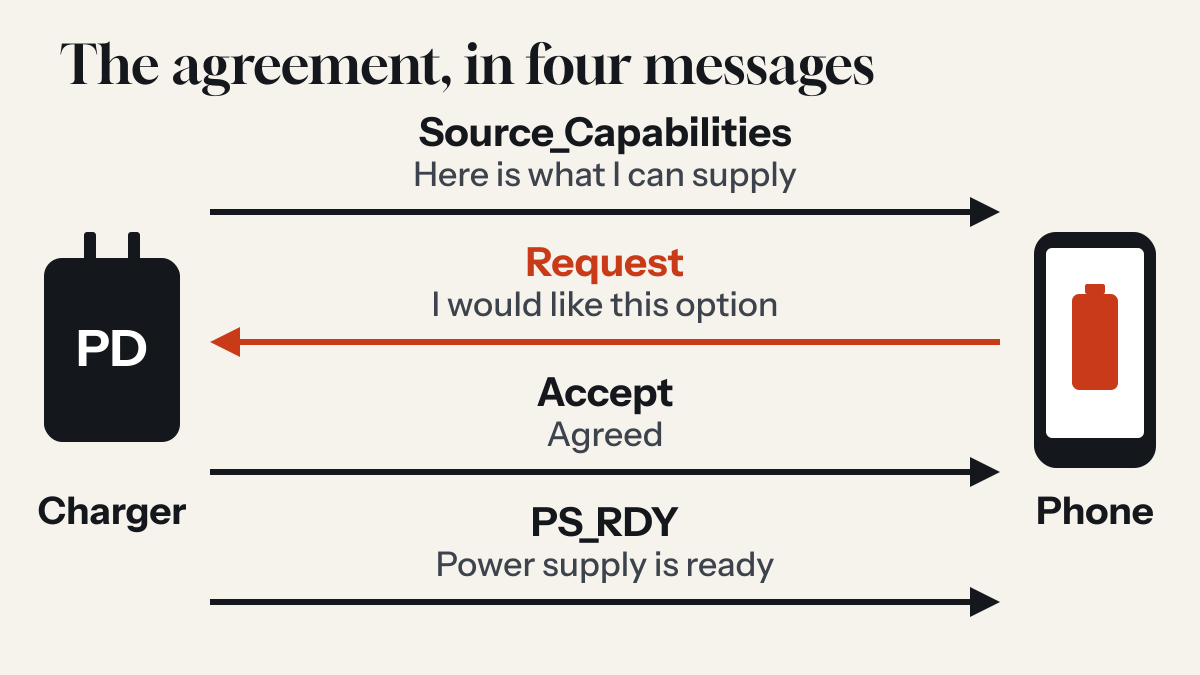
- The charger lists its optionsIt sends a Source_Capabilities message: a menu of power options, starting with the 5 V default.
- The device choosesA device that speaks PD replies with a Request message naming the option it prefers.
- The charger agreesIt checks that the request is valid and sends an Accept message.
- The charger switchesIt moves its supply to the agreed voltage and current limit, then sends PS_RDY, short for power supply ready. The device then starts drawing power under the agreement.
The cable can be part of this too. A PD charger can ask the cable to identify itself before the negotiation starts, and if the cable does not answer, the charger has to assume it can carry only 3 A. The guide to USB-C cables covers that step.
The power levels
PD now covers two ranges. USB-IF says the original standard was limited to 100 W at 20 V, and that revision 3.1 raised the ceiling to 240 W with new fixed voltages of 28 V, 36 V and 48 V.
| Range | Voltages and current | Power | Cable needed |
|---|---|---|---|
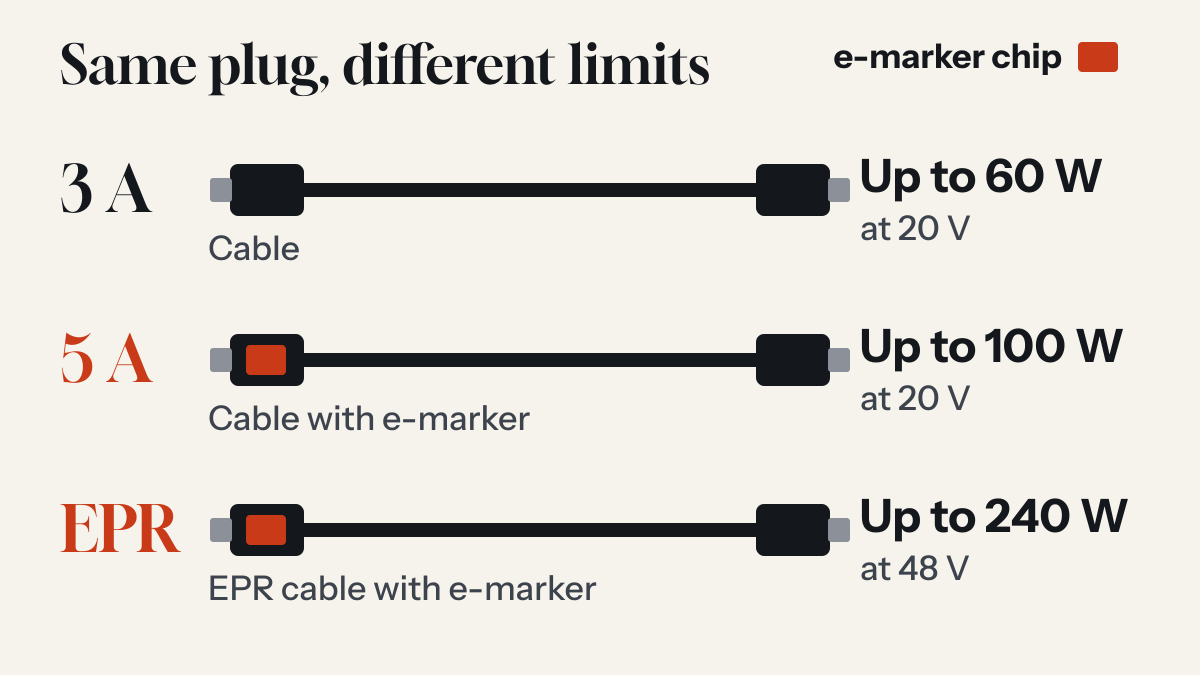
| Standard Power Range | 5, 9, 15 or 20 V at 3 A | 15 to 60 W | No special rating |
| Standard Power Range | 20 V at 5 A | Over 60 to 100 W | 5 A cable |
| Extended Power Range | 28, 36 or 48 V at 5 A | Over 100 to 240 W | EPR cable |
PPS and AVS: finer control
Fixed voltages are not the only option. Programmable Power Supply, or PPS, lets a device ask for a voltage in steps of 20 mV, which Texas Instruments describes as useful for fast charging that needs a fine-tuned level. Adjustable Voltage Supply, or AVS, works in 100 mV steps. Texas Instruments says the two have different uses.
This matters when you match a charger to a phone. Google recommends a compatible USB-C PD or PPS charger for Pixel phones. Apple says that to reach its fastest times on iPhone 18 Pro models and iPhone Duo, a comparable third-party adapter has to be 60W-capable, use AVS and support USB-PD 3.2.
Why a phone can charge below the number on the box
- The device asks for lessThe device picks from the menu, so a charger's top figure only applies to a device that requests it.
- The cable limits itWithout a cable rated above 3 A, a charger will not offer more than 3 A.
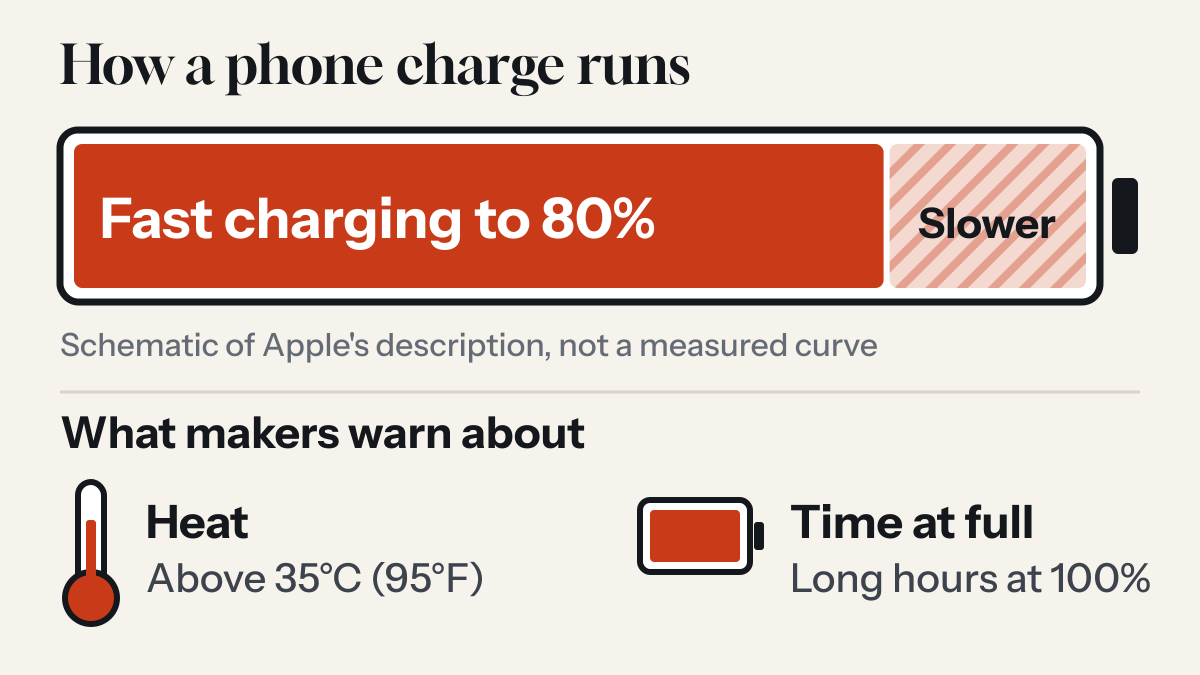
- The phone slows itselfApple says its phones fast charge to 80% and then slow down, and that software may limit charging above 80% when recommended battery temperatures are exceeded. The fast-charging guide has more on this.
Common questions
What is a PD charger?
A PD charger supports USB Power Delivery, a USB standard that lets a charger and a device agree on a voltage and current over a USB-C connection.
Can I use a charger with more watts than my phone needs?
In USB Power Delivery the device requests one of the options the charger offers, so the charger's wattage is the most it can supply rather than an amount it forces on the device.
Sources
- USB Charger (USB Power Delivery) USB Implementers Forum
- AN1974: Introduction to USB Power Delivery Over the USB Type-C Cable Microchip Technology
- USB Type-C and USB Power Delivery: Designing for both Extended Power Range and battery-powered systems Texas Instruments
- A Primer on USB Type-C and USB Power Delivery Applications and Requirements Texas Instruments
- An Engineer's Guide to USB Type-C Texas Instruments
- Fast charge your iPhone Apple Support
- Batteries: Why Lithium-ion? Apple
- Understand your Pixel battery Google Pixel Help
Read next
Are all USB-C cables the same? What the e-marker chip does
The plugs match. What the cable can carry does not, and some cables contain a small chip whose job is to say so.
Does fast charging damage your phone's battery?
Every lithium-ion battery wears out. Phone makers build fast charging around that fact, and what they warn owners about is heat and long hours at full charge.
Is USB-C the same as Thunderbolt? The plug is shared, the abilities are not
USB-C names the shape of a connector. Thunderbolt names what can run through it. A port can look identical and do very different things.